Key

Information

Warning

Integration

Enabling flags

Flags on Tapestry can act as tags, allowing you to filter your posts to quickly find observations or reflections.

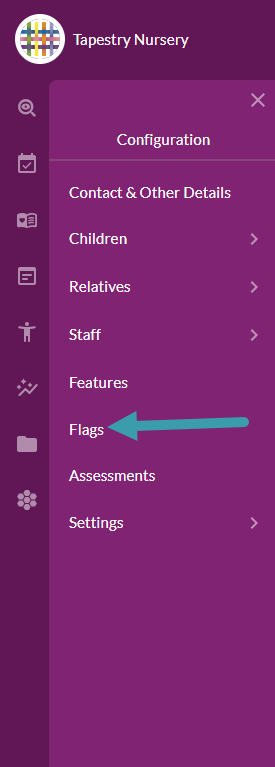
To enable or disable any of the pre-made flag sets on Tapestry, you’ll need to navigate to the Configuration section of the navigation menu. Then select Flags from the Configuration menu.

Do bear in mind that only managers on Tapestry have access to the Configuration section.

Flag Settings page

Once on the Flag settings page, at the top you will see the option to create your own Bespoke Flags.

Underneath you will see three different headings which all contain flag sets related to those headings.

If you open up a section, you will see all the flag sets within it.

All the flag sets within that heading can be turned on or off from the Enable All or Disable All buttons.

For each flag set you can View the flags included in that set and use the Configure button to enable/disable it or change any of the options for it. 

Below you can see what the Preview Flags and Configure pop-ups may look like.

On the Configure pop-up there are options to enable a flag set for Observations and Reflections

For Observations you can choose whether to make the flag visible to relatives as well. This option isn’t available for Reflections as this is a staff-only feature. 

If there are any extra options for a specific flag set this will appear at the bottom. 

So, that’s how to enable flag sets on Tapestry. These can then be used across the Observations and/or Reflections features.

Have you tried Tapestry yet?

Take out a free, no-obligation two week trial today.