In this tutorial we’re going to cover how to use the SEND framework on Tapestry — from switching it on for your account to recording SEND assessments in your observations. The framework is based on the old Development Matters document (2012), but replaces the age-bands with stages, and includes many more statements so your setting can demonstrate the small steps of progress a child with SEND might make.
If you’re looking for information about our other frameworks, please see our tutorial on enabling assessment frameworks.
Do bear in mind that only managers on Tapestry can enable and configure assessment frameworks from the browser.
Enabling the SEND framework
First, the framework needs to be switched on for your account. Go to Configuration, then select Assessments.
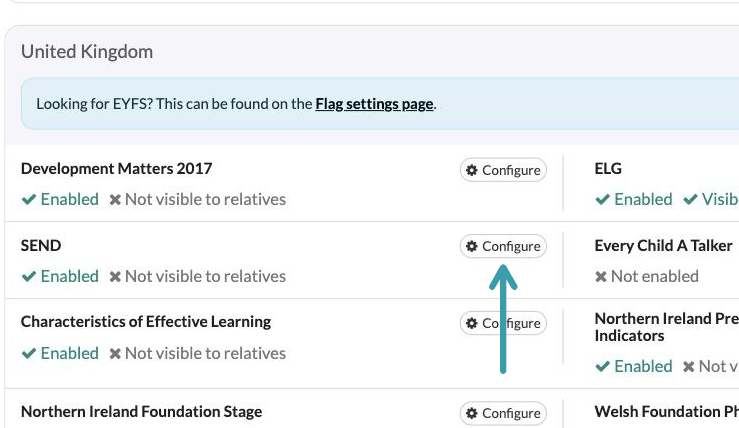
This takes you to the Assessment Framework Settings page, where every framework available to your account is listed by region. You’ll find SEND in the United Kingdom section — click Configure next to it.
In the window that opens, tick Enable SEND and press Submit. You can also tick Display SEND to relatives if you’d like relatives to see SEND assessments on published observations — they can view them, but they can’t make assessments themselves.
And if you’d like a copy of all the SEND statements to help with your teaching and assessment, there’s a download a copy link in the description.
Please note, when SEND is displayed to relatives it appears in their view under the simple heading ‘Assessments’ rather than ‘SEND’.
Recording SEND assessments in an observation
Once SEND is enabled, you can record assessments against it whenever you write an observation. Start a new observation as usual — give it a Title, choose the Children it’s about and add your Notes — then click + Add Assessments.
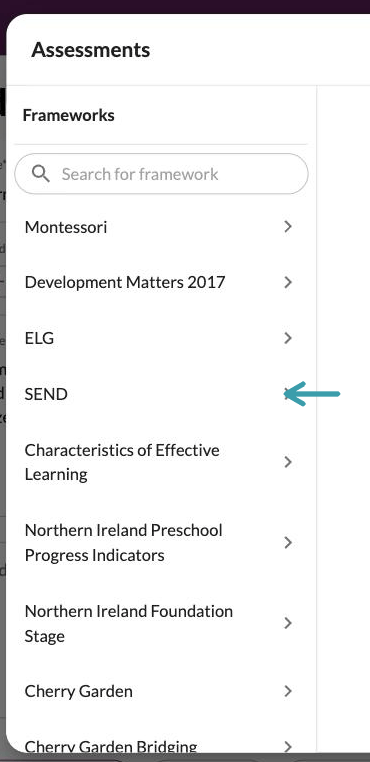
In the picker, select SEND from the Frameworks list — you can use the search box if your account has several frameworks enabled.
SEND is divided into the familiar seven areas of learning: Personal, Social and Emotional Development, Communication and Language, Physical Development, Literacy, Mathematics, Understanding the world and Expressive Arts and Design. Select an area to see its aspects, then select the aspect you’d like to assess.
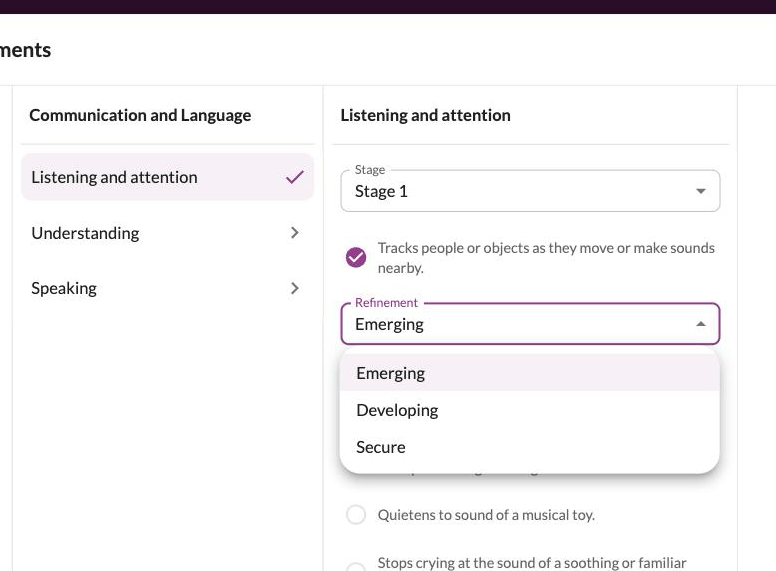
Each aspect has a Stage dropdown. Stages take the place of the old Development Matters age-bands, so you can assess the step a child is working at without tying it to an age — choose from Stage 1 to Stage 6, or ELG. Once you’ve chosen a stage, the statements for that stage are shown.
Tick the statement — or statements — that describe what you’ve observed. The list combines the old Development Matters statements with the additional SEND statements, which capture much smaller steps of progress. Each statement you tick gets its own Refinement dropdown, where you can record how secure the child is: Emerging, Developing or Secure. When you’ve finished, press Done.
Back on the observation, your SEND assessments are summarised under Assessments — you can edit or remove them from here. When you’re happy with everything, press Save Observation.
The assessment is saved with the observation and will appear on it in the child’s journal.
And that’s it! That’s how to use the SEND framework on Tapestry — from switching it on for your account, through choosing stages and statements in your observations, to recording the refinements that show those all-important small steps of progress.